
Quality - bunny.net Documentation
Parameter integer Control the compression level of the output image.Range: 0 to 100 (higher values = better quality, larger file size)Default: 85 (or configured Smart Image Optimization value) How it works The quality parameter controls the compression ratio applied to the image.
 Redirects - MintlifyMintlify
 Breaking down common documentation mistakesMintlify
 Mintlify Alternatives: What to Consider (and Why There's No True Substitute)Mintlify
 Format text - MintlifyMintlify
 Redis OM .NET UpdateRedis
 CLI ReferenceModal
 Summer Data Engineering RoadmapMotherduck
 Docker Desktop 4.23: Updates to Docker Init, New Configuration Integrity Check, Quick SearchDocker
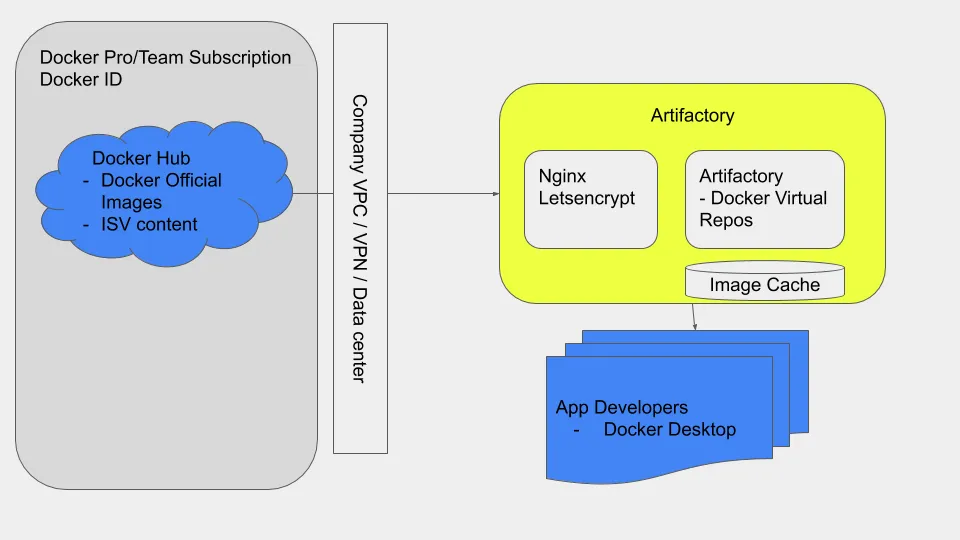 New Docker and JFrog Partnership Designed to Improve the Speed and Quality of App DevelopmentDocker
 Bringing More Power To Edge Rules! Introducing Variable ExpansionBunny
 Supporting the jsDelivr open source CDN with bandwidth for developersBunny
 bunny.net expands into Nairobi, KenyaBunny
 How to Make AI Videos Look Professional in 2025Heygen
 Best AI Video Generator for TikTok in 2026 (Tried & Tested)Heygen
