
JavaScript: Create a new user
If you would like to change this, you can disable "Email Confirmations" by going to Authentication -> Settings on supabase.com/dashboard If "Email Confirmations" is turned on, a user is returned but session will be null If "Email Confirmations" is turned off, both a user and a session will be returned When the user confirms their email address, they will be redirected to localhost:3000 by default.
 Create assistant message - MintlifyMintlify
 Meet Zapier Central's Chrome extensionZapier
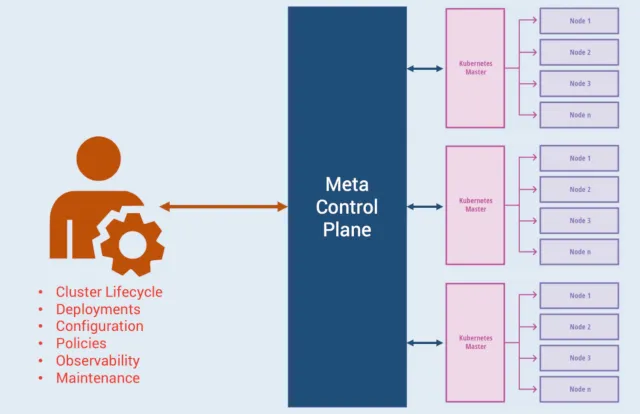 Google Anthos from the Eyes of a Kubernetes DeveloperThenewstack
 New Policy as Code Capabilities with CrossGuardPulumi
 Supporting Kubernetes with Faster, Easier Test EnvironmentsPulumi
 Pkg.go.dev has a new look! - The Go Programming LanguageGo
Go 2017 Survey Results - The Go Programming LanguageGo
Go 2018 Survey Results - The Go Programming LanguageGo
Pkg.go.dev has a new look! - The Go Programming LanguageGo
Go 2017 Survey Results - The Go Programming LanguageGo
Go 2018 Survey Results - The Go Programming LanguageGo
 Modal SDKs for JavaScript and Go (alpha)Modal
 Server-Side React RenderingCss Tricks
 4 Ways to Animate the Color of a Text Link on HoverCss Tricks
 Memo-ry: Simplifying Daily Tasks for People with Memory Loss - CerebrasCerebras
 How AI Assistants Can Decode GitHub Repos for UI WritersDocker
 A prompt guide to get the most out of HeyGen's new Video AgentHeygen
